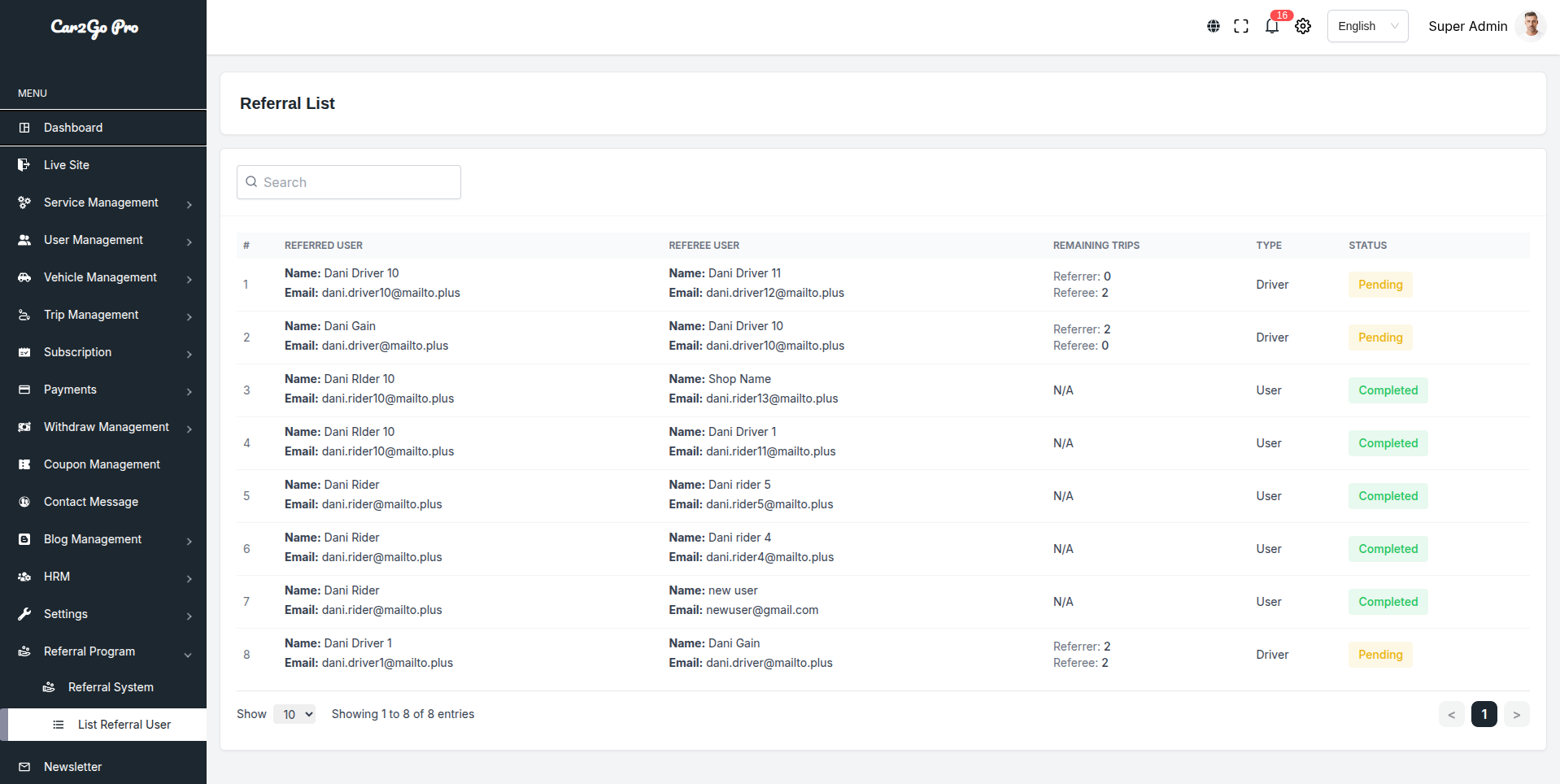
Referral List
1. Purpose of the Module
To encourage organic growth by rewarding existing users (referrers) when they invite new users (referees) who sign up and complete the required number of paid trips.
2. Key Features
- Unique referral code/link for every registered user (Driver & Rider)
- Both parties can receive bonus/wallet credit
- Configurable conditions and rewards
- Real-time tracking dashboard for Super Admin
- Automatic & manual approval options
3. Referral Workflow
- Existing user (Referrer) shares his unique referral code/link
- New user (Referee) registers using that code/link
- System automatically links both accounts and creates a record in the Referral List
- Referee must complete X number of paid & successful trips (configurable)
- Once conditions are met → Status changes from “Pending” → “Completed”
- Bonus is credited instantly to Referrer and/or Referee wallet
4. Database Table Structure (Referral List)
| Column | Description |
|---|---|
| id | Auto-increment primary key |
| referrer_user_id | ID of the user who shared the code (Referrer) |
| referrer_name | Name of referrer |
| referrer_email | Email of referrer |
| referee_user_id | ID of the new user who used the code (Referred user) |
| referee_name | Name of referee |
| referee_email | Email of referee |
| required_trips | Total trips the referee must complete (e.g., 2) |
| completed_trips | Trips already completed by referee |
| remaining_trips | required_trips – completed_trips (shown as “Referrer: X / Referee: Y”) |
| type | “Driver” or “User” (Rider) |
| status | Pending / Completed |
| created_at | Timestamp when referral record was created |
| updated_at | Timestamp when status last changed |
5. Admin Panel Capabilities (Current Implementation)
| Feature | Status | Location in Admin |
|---|---|---|
| View full referral list | Available | Referral Program → List Referral User |
| Search by name/email | Available | Search bar at the top |
| Pagination & show entries | Available | Bottom of page |
| Filter by status/type | Coming soon | — |
| Manual approve/reject | Partial | (only auto-approve in current version) |
| Delete suspicious referrals | Available | Trash icon in Actions column (if enabled) |
| Export to CSV/Excel | Not visible | (can be added) |
6. Reward Configuration (Admin Settings)
Path: Referral Program → Settings or Settings → Referral System
| Setting | Default (current) | Can be customized? |
|---|---|---|
| Required trips by referee | 2 trips | Yes |
| Reward for Referrer | Configurable amount | Yes |
| Reward for Referee (new user) | Configurable amount | Yes |
| Reward type | Wallet credit / Coupon | Yes |
| Both-side reward enabled | Yes | Yes |
| Referral valid only for first trip | Optional | Yes |
7. Status Explanation
| Status | Meaning | Action Required |
|---|---|---|
| Pending | Referee has not completed required trips yet | Wait or check trips manually |
| Completed | All conditions fulfilled → reward already credited | Nothing (just monitoring) |